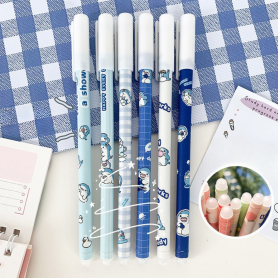
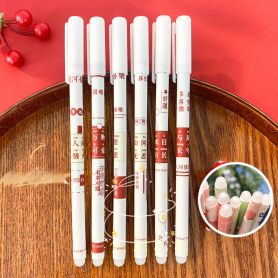
0.5mm Erasable Ink Pen - Baby Shark - Blue and White Check - (10pcs)
iPhone 15
There are 124 products.
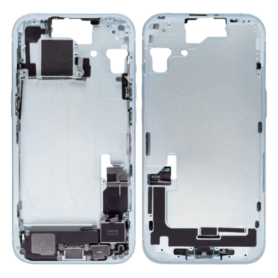
Back Cover Housing iPhone 15 eSIM without Back Glass Bleu without Battery (Original Dismantled) Grade AB
1 Last items in stock
Introducing the Back Cover Housing for iPhone 15 eSIM, a meticulously crafted original dismantled part that promises both functionality and subtle elegance. This Grade AB quality component ensures that you can restore or replace your phone's housing without compromising on style or integrity.
Key Features:
Original Dismantled Part: Sourced from genuine iPhone 15 models, offering guaranteed compatibility and perfect fit.
Grade AB Quality: Exhibits minor wear typical of Grade AB, balancing affordability with reliable performance.
Color - Bleu: A sophisticated blue finish that provides a refreshing aesthetic, enhancing the visual appeal of your smartphone.
eSIM Compatibility: Specifically designed for the iPhone 15 eSIM version, ensuring seamless integration with your device's existing features.
No Back Glass: Provides the essential core housing, allowing customization with your choice of back glass for a personalized touch.
Battery Not Included: Focused on housing replacement needs, providing a perfect solution for those not requiring a new battery.
High-Quality Material: Crafted to maintain structural integrity, protecting the internal components of your device while sustaining everyday wear.
This back cover is the ideal choice for repair enthusiasts or those looking to refresh the exterior of their iPhone 15 without the need for a full replacement.
Key Features:
Original Dismantled Part: Sourced from genuine iPhone 15 models, offering guaranteed compatibility and perfect fit.
Grade AB Quality: Exhibits minor wear typical of Grade AB, balancing affordability with reliable performance.
Color - Bleu: A sophisticated blue finish that provides a refreshing aesthetic, enhancing the visual appeal of your smartphone.
eSIM Compatibility: Specifically designed for the iPhone 15 eSIM version, ensuring seamless integration with your device's existing features.
No Back Glass: Provides the essential core housing, allowing customization with your choice of back glass for a personalized touch.
Battery Not Included: Focused on housing replacement needs, providing a perfect solution for those not requiring a new battery.
High-Quality Material: Crafted to maintain structural integrity, protecting the internal components of your device while sustaining everyday wear.
This back cover is the ideal choice for repair enthusiasts or those looking to refresh the exterior of their iPhone 15 without the need for a full replacement.
€39.60
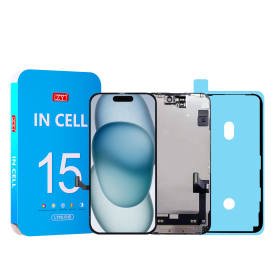
Screen iPhone 15 (INCELL) ZY - COF - FHD1080p - Diagnosable
Out-of-Stock
Use Repair Assistant to Finish an iPhone or iPad Repair
On an iPhone 12 or later running iOS 18, when a new Apple screen is installed,“Finish Repair” will appear next to Screen until you complete the repair using the Repair Assistant.
On an iPhone 12 or later running iOS 18, it is possible to reuse an original Apple screen on another iPhone of the same model.
The date of first use and the condition of the screen can be found in Settings > General > About > Parts & Service History.
How to Run Diagnostics & Finish Repair for iPhone Screen
1. Ensure your device is updated to iOS 18
2. Go to Settings > General > About > Parts & Service History
3. Tap "Restart & Finish Repair" to activate the Repair Assistant
4. Follow the on-screen instructions to complete the calibration
After completing this process, your screen will be fully functional, and there will be no pop-up warning about non-genuine parts.
Important Notes:
Your iPhone must be connected to Wi-Fi
Your battery level should be above 20%
If the process fails, restart your device and try again
If the repair is not completed, the screen may not function optimally, and some features (True Tone, Face ID) may be disabled until calibration is finalized
€30.88
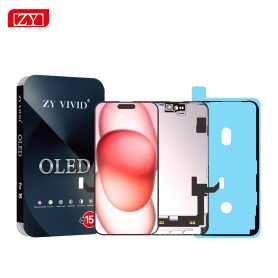
Screen iPhone 15 (OLED) ZY - Diagnosable
Out-of-Stock
Use Repair Assistant to Finish an iPhone or iPad Repair
On an iPhone 12 or later running iOS 18, when a new Apple screen is installed,“Finish Repair” will appear next to Screen until you complete the repair using the Repair Assistant.
On an iPhone 12 or later running iOS 18, it is possible to reuse an original Apple screen on another iPhone of the same model.
The date of first use and the condition of the screen can be found in Settings > General > About > Parts & Service History.
How to Run Diagnostics & Finish Repair for iPhone Screen
1. Ensure your device is updated to iOS 18
2. Go to Settings > General > About > Parts & Service History
3. Tap "Restart & Finish Repair" to activate the Repair Assistant
4. Follow the on-screen instructions to complete the calibration
After completing this process, your screen will be fully functional, and there will be no pop-up warning about non-genuine parts.
Important Notes:
Your iPhone must be connected to Wi-Fi
Your battery level should be above 20%
If the process fails, restart your device and try again
If the repair is not completed, the screen may not function optimally, and some features (True Tone, Face ID) may be disabled until calibration is finalized
€46.90
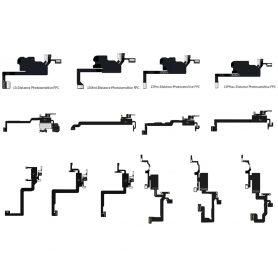
Programming Mat for iPhone X - 16 Pro Max Proximity Sensor (JCID)
7 In-stock
Programming Mat for iPhone X - 16 Pro Max Proximity Sensor (JCID)
Enhance your repair toolkit with the JCID Programming Mat, specifically designed for the iPhone X through to the 16 Pro Max Proximity Sensors. This versatile tool simplifies the intricate process of proximity sensor calibration and programming, offering essential features for professionals:
Wide Compatibility: Suitable for iPhone models from X to 16 Pro Max, addressing a broad spectrum of repair needs.
Precision Calibration: Ensures accurate proximity sensor calibration, enhancing device functionality and sensor reliability post-repair.
User-Friendly Interface: Designed with intuitive controls, making it easy for technicians to navigate and perform programming tasks efficiently.
Durable Design: Constructed with high-quality materials, the mat withstands daily use in busy repair environments, promising lasting durability and performance.
Time-Efficient Operations: Streamlines the programming process, allowing for quicker turnaround times and improved service efficiency.
Portable Size: Compact and lightweight, ideal for on-the-go repairs without compromising on capability.
Comprehensive Support: Comes with detailed instructions and access to online resources to assist technicians, whether they are novices or seasoned professionals.
Equip yourself with the JCID Programming Mat to ensure high standards in repair quality and customer satisfaction.
Enhance your repair toolkit with the JCID Programming Mat, specifically designed for the iPhone X through to the 16 Pro Max Proximity Sensors. This versatile tool simplifies the intricate process of proximity sensor calibration and programming, offering essential features for professionals:
Wide Compatibility: Suitable for iPhone models from X to 16 Pro Max, addressing a broad spectrum of repair needs.
Precision Calibration: Ensures accurate proximity sensor calibration, enhancing device functionality and sensor reliability post-repair.
User-Friendly Interface: Designed with intuitive controls, making it easy for technicians to navigate and perform programming tasks efficiently.
Durable Design: Constructed with high-quality materials, the mat withstands daily use in busy repair environments, promising lasting durability and performance.
Time-Efficient Operations: Streamlines the programming process, allowing for quicker turnaround times and improved service efficiency.
Portable Size: Compact and lightweight, ideal for on-the-go repairs without compromising on capability.
Comprehensive Support: Comes with detailed instructions and access to online resources to assist technicians, whether they are novices or seasoned professionals.
Equip yourself with the JCID Programming Mat to ensure high standards in repair quality and customer satisfaction.
€20.00