

 Ugreen
.png) Devia
 Mayline
 (1).png) D-power
.png) Araree
 Apple Original
 Samsung Original
 Xiaomi
 LinQ
 JBL
.png) Belkin
 1More
 Techmade
 Benks
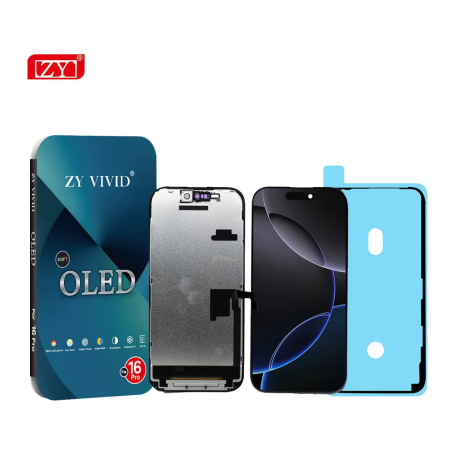

Screen iPhone 16 Pro (Soft OLED) ZY - 1:1 120Hz - Diagnosable
Use Repair Assistant to Finish an iPhone or iPad Repair
On an iPhone 12 or later running iOS 18, when a new Apple screen is installed,
“Finish Repair” will appear next to Screen until you complete the repair using the Repair Assistant.

On an iPhone 12 or later running iOS 18, it is possible to reuse an original Apple screen on another iPhone of the same model.
The date of first use and the condition of the screen can be found in Settings > General > About > Parts & Service History.
How to Run Diagnostics & Finish Repair for iPhone Screen
1. Ensure your device is updated to iOS 18
2. Go to Settings > General > About > Parts & Service History
3. Tap "Restart & Finish Repair" to activate the Repair Assistant
4. Follow the on-screen instructions to complete the calibration
After completing this process, your screen will be fully functional, and there will be no pop-up warning about non-genuine parts.
Important Notes:
- Your iPhone must be connected to Wi-Fi
- Your battery level should be above 20%
- If the process fails, restart your device and try again
- If the repair is not completed, the screen may not function optimally, and some features (True Tone, Face ID) may be disabled until calibration is finalized
The iPhone 16 Pro (Soft OLED) ZY - 1:1 120Hz screen is designed to replace the screen of iPhone 16 Pro models, offering perfect compatibility with the corresponding model code. This standard color component is manufactured by Eco-Solution and has the part number MPN ZYSOledDiag16PM.
Features
- Part type: Soft OLED Screen
- Compatibility: iPhone 16 Pro
- Refresh rate: 120Hz
- Brand: Eco-Solution
- MPN: ZYSOledDiag16PM
- Functionality: Diagnosable
Workshop Use
The installation of this screen must be done carefully to avoid damaging the connectors or the screen itself. Ensure that the device is turned off and disconnected from any power source before proceeding with the replacement. Use appropriate tools to disassemble the device and follow standard procedures to ensure a successful installation.
Frequently Asked Questions
How can I tell if the screen has been installed correctly?
Once the screen is installed, you can check its proper functioning through the Repair Assistant on an iPhone 12 or later model running iOS 18. This allows you to finalize the repair and ensure that the screen is recognized by the system.
Is it possible to reuse this screen on another device?
Yes, for an iPhone 12 or later model running iOS 18, it is possible to reuse an original screen on another iPhone of the same model, by checking the parts history in the device settings.

- Quality
- SOFT OLED
- Spare Parts Type
- Screen
- Smartphone Model
- iPhone 16 Pro
- Name: Droit de rétractation
- Description
Votre produit acheté en magasin ou commandé sur le web ne vous convient pas ? Vous pouvez décider de le retourner dans un délai de 14 jours suivant sa réception.
Click here for more details