

 Ugreen
.png) Devia
 Mayline
 (1).png) D-power
.png) Araree
 Apple Original
 Samsung Original
 Xiaomi
 LinQ
 JBL
.png) Belkin
 1More
 Techmade
 Benks
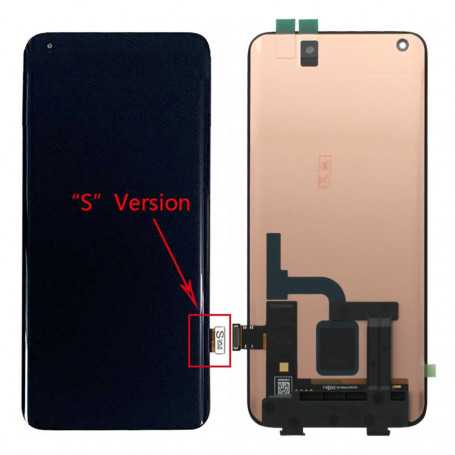

Screen Xiaomi Mi 10 Black (S) with Compatible Connector
How to distinguish
>>Enter * # * #284 # * # * on the dial pad
>> At the bottom of the notification bar ~ wait for the progress bar to finish
>> Go to the file manager and find MIUI/debug_log/bugreport-xxxx.zip
>> Unzip it and find the bugreport-xxxx.txt file to open
>>Search for "MSM _"Find the dsi_display0 code line, if it is mdss_dsi_j2_p2_1 _38_ 0c_0a_dsc_cmd,
With Number 38 Is for the S version
screen-S42 for the C version
The Xiaomi Mi 10 Black (S) screen with compatible connector is designed for Xiaomi Mi 10 models. This replacement component is ideal for restoring the device's display functionality while maintaining perfect compatibility with the specific model.
Features
- Part type: Screen
- Compatibility: Xiaomi Mi 10
- Color: Black
- Version: S
Workshop use
Installing this screen requires careful handling to avoid damaging the connectors or the new screen. It is recommended to carry out this operation in a clean, well-lit environment, using the appropriate tools to ensure a perfect fit and proper operation of the device once reassembled.
Frequently asked questions
How can I check the screen version installed on my Xiaomi Mi 10?
To check the screen version, enter the code *#*#284#*#* in the dialer, wait for the progress to finish, then open the file manager to find the bugreport-xxxx.txt file. Look for the dsi_display0 code line to identify the version.
Does this product include adhesive for installation?
The product name does not mention the inclusion of an adhesive, so it is recommended to check separately whether adhesive is required for installation.

- Quality
- Compatible
- Spare Parts Type
- Screen
- Smartphone Model
- Xiaomi Mi 10
- Name: Droit de rétractation
- Description
Votre produit acheté en magasin ou commandé sur le web ne vous convient pas ? Vous pouvez décider de le retourner dans un délai de 14 jours suivant sa réception.
Click here for more details