

 Ugreen
.png) Devia
 Mayline
 (1).png) D-power
.png) Araree
 Apple Original
 Samsung Original
 Xiaomi
 LinQ
 JBL
.png) Belkin
 1More
 Techmade
 Benks
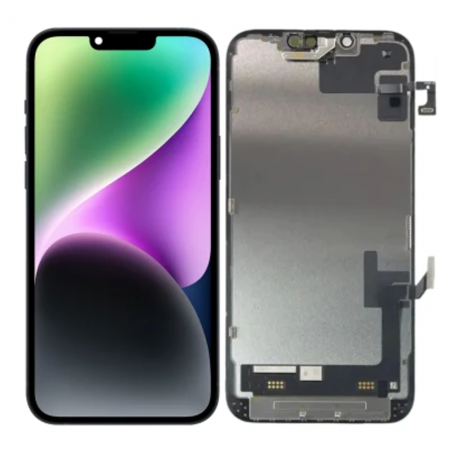


Screen iPhone 14 Plus with Proximity Sensor Flex (Original Refurbished) - Supports Configuration
Use Repair Assistant to Finish an iPhone or iPad Repair
On an iPhone 12 or later running iOS 18, when a new Apple screen is installed,
“Finish Repair” will appear next to Screen until you complete the repair using the Repair Assistant.

On an iPhone 12 or later running iOS 18, it is possible to reuse an original Apple screen on another iPhone of the same model.
The date of first use and the condition of the screen can be found in Settings > General > About > Parts & Service History.
How to Run Diagnostics & Finish Repair for iPhone Screen
1. Ensure your device is updated to iOS 18
2. Go to Settings > General > About > Parts & Service History
3. Tap "Restart & Finish Repair" to activate the Repair Assistant
4. Follow the on-screen instructions to complete the calibration
After completing this process, your screen will be fully functional, and there will be no pop-up warning about non-genuine parts.
Important Notes:
- Your iPhone must be connected to Wi-Fi
- Your battery level should be above 20%
- If the process fails, restart your device and try again
- If the repair is not completed, the screen may not function optimally, and some features (True Tone, Face ID) may be disabled until calibration is finalized
The iPhone 14 Plus screen with proximity sensor flex is an original refurbished spare part, compatible with the iPhone 14 Plus model. This component, offered by the brand Eco-Solution, is designed to support configuration and installation on devices requiring screen repair.
Features
- Part Type: Screen with proximity sensor flex
- Compatibility: iPhone 14 Plus
- Brand: Eco-Solution
- MPN: ori14plus
- Condition: Original refurbished
Workshop Use
The installation of this refurbished screen on an iPhone 14 Plus must be done carefully to avoid damaging internal components. Ensure that the device is powered off and that the appropriate tools are used for disassembly and reassembly. After installation, it is recommended to use the repair assistant to finalize the configuration if necessary.
Frequently Asked Questions
How can I tell if the screen is installed correctly?
After installation, check that the screen functions properly by testing touch responsiveness and display. Use the repair assistant to confirm the configuration.
Does this product include adhesive for installation?
The product does not mention the inclusion of adhesive, so it is advisable to prepare to provide compatible adhesive to ensure secure installation.

- Spare Parts Type
- Screen
- Smartphone Model
- iPhone 14 Plus
- Quality
- Original Refurbished
- Name: Droit de rétractation
- Description
Votre produit acheté en magasin ou commandé sur le web ne vous convient pas ? Vous pouvez décider de le retourner dans un délai de 14 jours suivant sa réception.
Click here for more details